How do I connect my WooCommerce store with Printegy?
Would you like to have your WooCommerce orders automatically produced and shipped through Printegy? With the Printegy WooCommerce integration, you can connect your existing WooCommerce store directly to your Printegy account.
The connection is made through our plugin and allows you to transfer products from Printegy to your WooCommerce store and automatically forward orders to Printegy. The integration is free of charge.
What do I need for the connection?
To use the integration, you need:
- an active WooCommerce store
- a Printegy account
- the Printegy WooCommerce plugin
- products that you want to have produced through Printegy
You can connect both a new WooCommerce store to Printegy and link existing products to Printegy through SKU-based product migration.
1. Create a Printegy account
If you do not have a Printegy account yet, first create a free account.
Afterwards, you can connect your WooCommerce store to your account through the Printegy plugin.
2. Connect WooCommerce with Printegy
Install the Printegy plugin in your WooCommerce store and then connect it to your Printegy account https://app.printegy.de/woocommerce/install
Alternatively, you can also connect your WooCommerce store internally through your Printegy account profile. Follow these steps:
1. Go to your Printegy account and click the arrow next to your profile name. A menu will open, where you can click on the My Stores option.
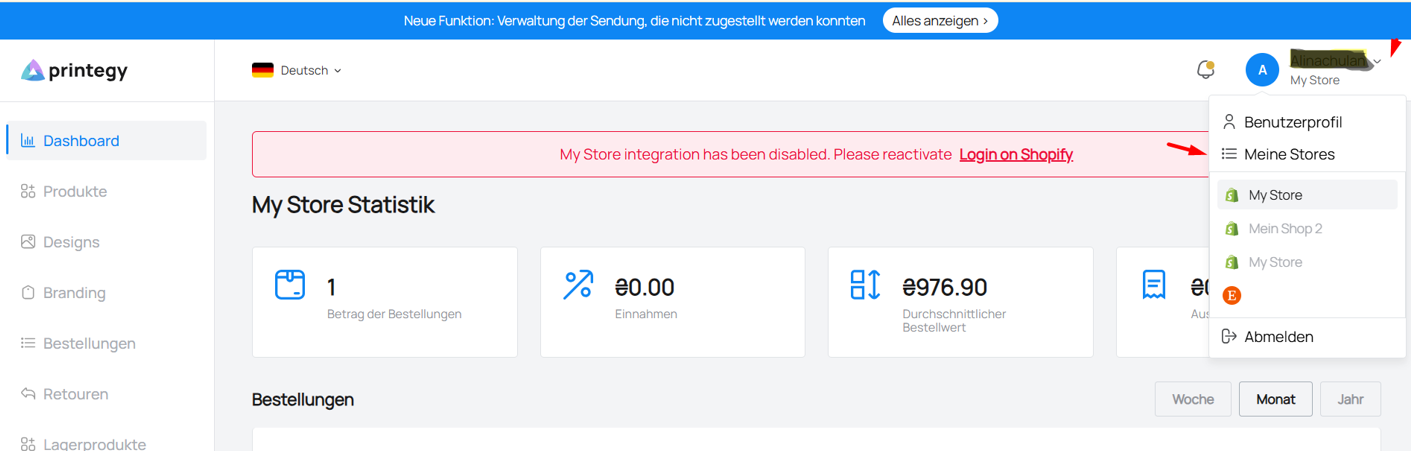
2. Click on Connect a new store
.png)
3. Click on the WooCommerce option
.png)
The page will then take you to the plugin page, where you can enter your store URL and connect your store.
After a successful connection, your WooCommerce store and your Printegy account can communicate with each other.
Tip: Use the Printegy account for the connection that you will later use to manage your products and orders.
3. Create products in Printegy
First, create the desired print-on-demand products in Printegy.
To do this, select the desired product, upload your design, and configure the available variants such as colors and sizes.
You can then synchronize the product with your WooCommerce store and publish it there. The Printegy WooCommerce integration allows you to publish your created products directly from Printegy.
4. Synchronize products with WooCommerce
After creating a product in Printegy, you can transfer it to your WooCommerce store.
The product information required for order fulfillment will be linked to your store.
You can then edit your product page in WooCommerce as usual – for example, the product description, selling price, categories, and other store content.
Important: Make sure not to unintentionally change the product and variant information required by Printegy. For an order to be automatically assigned, the corresponding products or SKUs must be correctly linked to Printegy.
5. Connect existing WooCommerce products with Printegy
Do you already have products in your WooCommerce store and do not want to create them again?
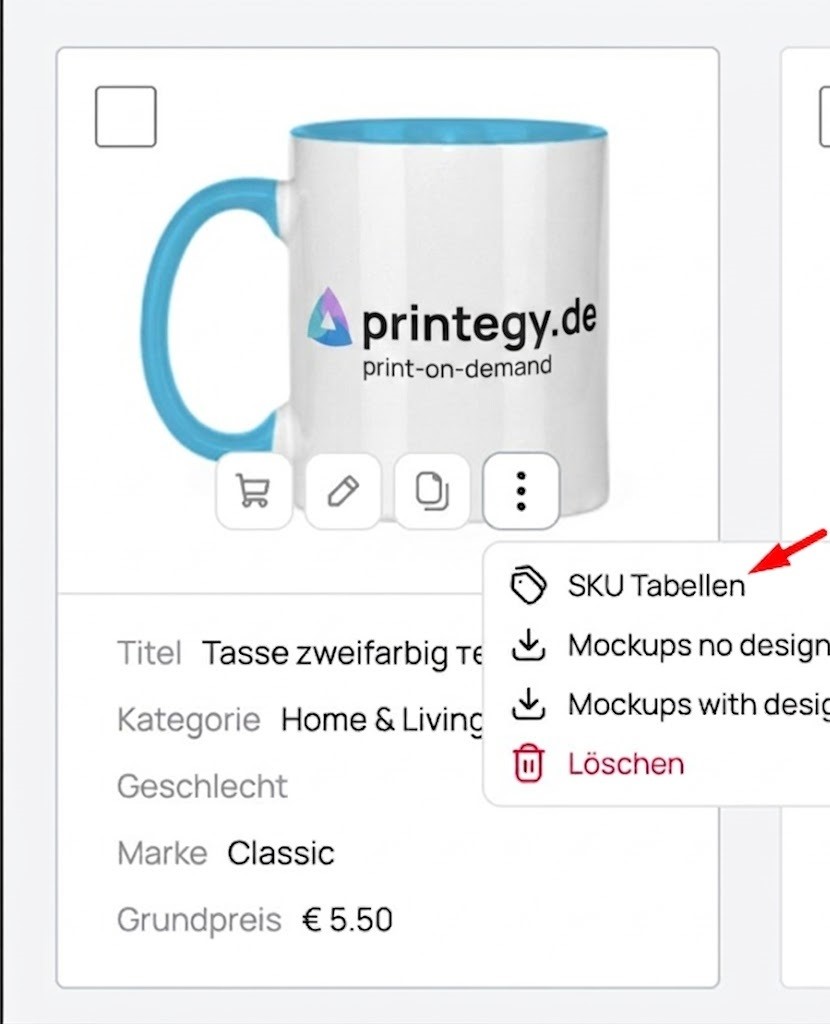
Then you can connect your existing products to Printegy using the SKU.
First, create the corresponding product in Printegy and transfer the associated SKU information to your existing WooCommerce product.
This allows you to continue using your existing product range without having to completely recreate all product pages.
Important: For products with multiple variants, each variant must be correctly linked to the corresponding Printegy SKU. This is the only way an incoming order can be assigned to the correct product and variant.
6. What happens when a customer places an order?
As soon as a customer orders a Printegy-connected product in your WooCommerce store, the order is automatically transmitted to Printegy.
The process looks as follows:
Customer places an order in WooCommerce → Order is transferred to Printegy → Printegy produces the product → Order is packaged → Shipped to your customer
You do not need to manually copy the order details or create each order individually in Printegy.
7. Production and shipping
After the order has been transferred, Printegy takes care of the further processing of your order.
The product is produced in Germany, then packaged and shipped directly to your customer. DHL is one of the carriers used for shipping.
For products in stock, the production time at Printegy is generally 1–2 business days.
What happens to the selling price?
You set the selling price of your product in your WooCommerce store.
Printegy charges you for the production and the services you select. The difference between your selling price and your Printegy costs represents your potential margin – excluding any additional store and payment fees.
When setting your prices, you should therefore consider not only the product price but also shipping costs, payment fees, and any additional services.
Which products and services can I use?
With the WooCommerce integration, you can use Printegy's regular products for your print-on-demand business.
Different printing methods are available depending on the product. Printegy offers DTG and DTF, among others. Depending on the product and requirements, services such as branding, personalization, returns management, and alternative designs can also be used.
You can also use Printegy's free mockups for presenting your products.
Can I keep my existing WooCommerce store?
Yes. You do not need to completely rebuild your existing store.
If your products are already available in WooCommerce, you can connect them to Printegy using the SKU. This allows you to continue using your existing product range and already configured product pages.
For larger product ranges or special requirements, Printegy also offers an individual onboarding process, which can include support for expanding your product range and importing designs.
What should I do if an order is not transferred?
If an order does not automatically appear in Printegy, you should first check:
- Is the connection between WooCommerce and Printegy still active?
- Is the ordered product connected to Printegy?
- Are the SKUs of the products and variants correct?
- Was the order successfully created in WooCommerce?
- Is there an error message in the WooCommerce or Printegy integration?
If the problem persists, please send our support team the WooCommerce order number, the affected SKU, and, if applicable, a screenshot of the product or variant settings.
Our support team will be happy to help you.
Frequently Asked Questions
Is the WooCommerce integration free?
Yes. The Printegy WooCommerce integration is free of charge.
Are WooCommerce orders automatically transferred to Printegy?
Yes. Orders for connected Printegy products are automatically transmitted to Printegy and prepared for production.
Can I use existing WooCommerce products?
Yes. Existing products can be connected to Printegy using the SKU.
Do I have to enter orders manually in Printegy?
No. With a correctly configured direct WooCommerce integration, orders are automatically transferred to Printegy.
Where are my products produced?
Orders processed through the WooCommerce integration are produced in Germany.
What happens after production?
Printegy takes care of packaging and shipping directly to your customer.
Need help setting everything up?
If you need assistance connecting your WooCommerce store to Printegy, you can contact our support team at any time.
Email: hello@printegy.de
Ready to connect?